WordPress

WordPress Optimization Using Yoast Plugin

Yoast SEO Plugin

Yoast SEO Plugin is a Widely used WordPress tool to optimize WordPress websites and posts. Because of its easiness to utilise, around 50 lack of regular updates is happening through Yoast Plugin. WordPress optimization is now painless and well ordered because of Yoast SEO. This plugin suggests a wide range of indicators to make WordPress Optimization effortless.

Yoast SEO Indicators for WordPress Optimization

Yoast SEO Indicators are helping tools that analyse our content and provide suggestions to improve optimization.

  • If the indicator is green, the page is optimized.
  • If the indicator is dark, SEO Plugin is not on in that page.
  • If the indicatoris red, The page is not optimized.
  • If the indicator is yellow or orange, the page needs improvement
  • If the indicator showing blue colour, the page is not crawlable.

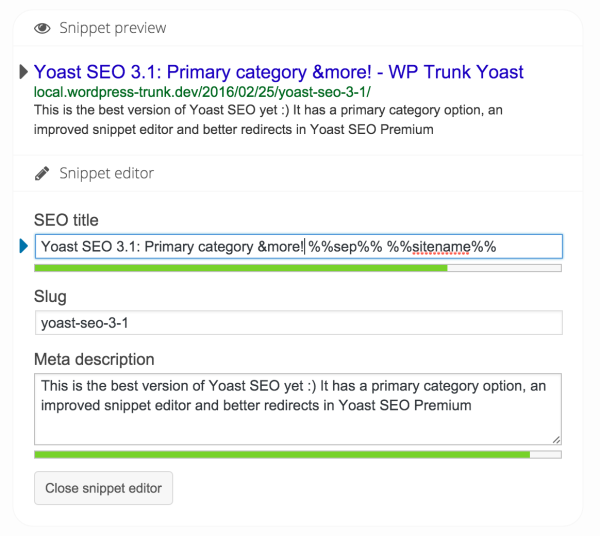
In order to improve on-page optimization, add meta description and page title. With the help of this snippet preview(brief extraction of web result including URL, title, mrtadescription etc.), we can make sure everything is added. Slug should include keyphrease of the content. Keep in mind to write the best keyphrase that is suitable for the content and title. otherwise, yoast indicatiors will not become green!

Yoast SEO Analysis

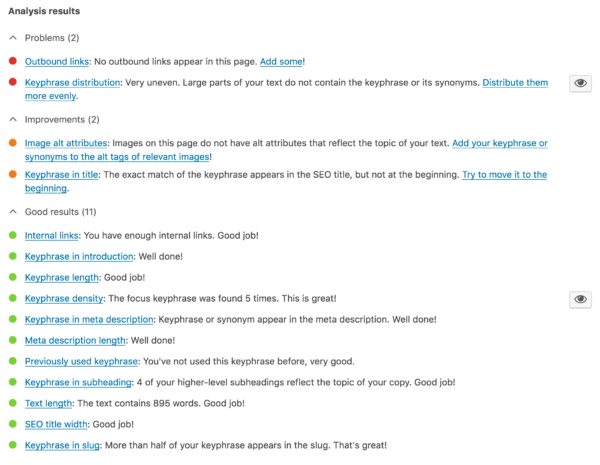
Yoast SEO plugin activated post shows these icons:

  • SEO title width: SEO title width should be medium.
  • Keyphrase length: It should be a medium length.
  • Keyphrase in slug: Keyphrase should appear in the URL(slug) also.
  • Text length: Length of the content needs to be a minimum of 300 words.
  • Keyphrase in subheading: Keyphrase should appear in the subheading also.
  • Previously used keyphrase: Do not use previously used keyphrase.
  • Keyphrase in introduction: Keyphrase should be added in thed introduction paragraph
  • Meta description length: It is the short description of the content. It should be under 1024 pixel.
  • Keyphrase in meta description: Keyphrase should be added in meta description.
  • Keyphrase density: Content needs to have a minimum of 4 focusing key words.
  • Internal links: Needs to have internal links to boost Page ranking. Internal links are links from one page to another but the same domain.
  • Outbound links: Outbound links are links from one website to another to boost crawlability. A content needs to have outbound links.
  • Image alt attributes: Images needs to be described(alt texting).

After completing optimization, savedraft and then publish the post.

Yoast Seo plugin is the best and time saving optimization tool for WordPress sites and posts. With the help of this tool we can get higher rank and traffic for our sites. All we need is just follow the steps and turn the red indicators to green by clearing the mistakes.

anju

Share
Published by
anju

Recent Posts

Benefits of Social Media for Businesses and Individuals | Complete Guide

Benefits of Social Media for Businesses and Individuals   The benefits of social media have…

1 week ago

Advantages of Social Media Marketing for Small Businesses

Advantages of Social Media Marketing for Small Businesses In today’s competitive online world, social media…

2 weeks ago

Benefits of Social Media Marketing for Small Businesses

Introduction The internet has changed the way businesses communicate with customers. Today, social media platforms…

2 weeks ago

Benefits of Social Media Marketing for Small Businesses

Benefits of Social Media Marketing for Small Businesses | Complete Guide In today’s fast-paced digital…


2 weeks ago

Image Optimization for SEO: Boost Speed & Rankings

Image optimization for SEO is essential for improving website speed, user experience, and search rankings.…

2 months ago

SEO Mistakes That Are Killing Your Rankings

Critical SEO Mistakes You Need to Fix Now Many websites make common SEO mistakes that…

2 months ago